
Download Echobase – AI‑Powered Business Collaboration Tool
What Is Echobase and Why It Matters for Modern Teams
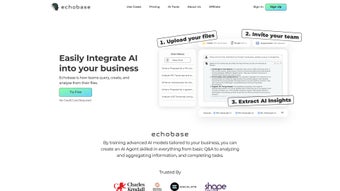
Echobase is a cloud‑native, AI‑driven workspace that brings together document management, intelligent search, and real‑time collaboration in a single, secure environment. Built for enterprises that wrestle with ever‑growing knowledge bases, the platform lets users create custom AI agents that understand company‑specific jargon, policies, and data structures without requiring a data‑science background. By indexing files from Google Drive, SharePoint, Dropbox, and on‑premise repositories, Echobase turns static PDFs, Word documents, and spreadsheets into searchable assets that can answer natural‑language questions instantly.
Security is baked in: end‑to‑end TLS encryption, AES‑256 at rest, role‑based access controls, and comprehensive audit logs keep sensitive information safe while remaining accessible to authorized users. The solution also offers pre‑built connectors for leading business applications such as Salesforce, SAP, and Zendesk, enabling AI‑powered workflows that automate routine tasks like contract renewal alerts or ticket triage. In short, Echobase replaces time‑consuming manual searches with an intelligent assistant that delivers accurate answers in seconds, helping teams make faster, data‑backed decisions.
Key Features That Drive Productivity
Echobase’s feature set is designed to address the most common pain points in document‑centric organizations. The platform’s visual AI Agent Builder lets non‑technical users drag and drop data sources, define intents, and train models in minutes. A universal ingestion engine automatically extracts text from PDFs, DOCX, XLSX, and plain‑text files, preserving folder hierarchy for contextual relevance.
Real‑time collaboration mirrors the experience of cloud editors, allowing multiple users to comment, annotate, and query documents simultaneously. Robust RBAC ensures that each AI agent only sees data it is permitted to process, while detailed version history and audit trails satisfy compliance auditors. Advanced analytics provide sentiment scoring, trend detection, and automatic summarization, turning raw data into actionable insights.
Security‑first architecture includes SOC‑2 compliance, GDPR and CCPA adherence, and optional private‑cloud deployments for ultra‑sensitive environments. Finally, the auto‑scaling cloud infrastructure guarantees responsive performance during peak usage without manual intervention.
- Custom AI Agent Builder: No‑code workflow designer for tailored models.
- Universal Document Ingestion: Supports PDF, DOCX, XLSX, TXT, and more.
- Real‑Time Collaboration: Simultaneous editing, commenting, and querying.
- Role‑Based Access Control (RBAC): Granular permissions per user, team, or department.
- Advanced Search & Analytics: Natural‑language queries, sentiment analysis, trend detection.
- Secure Architecture: TLS 1.3, AES‑256 at rest, SOC‑2, GDPR, CCPA.
- Integration Hub: Connectors for Google Drive, OneDrive, SharePoint, Dropbox, Salesforce, SAP, Zendesk.
- Version History & Audit Trails: Full change logs for compliance.
- Scalable Cloud Infrastructure: Auto‑scaling containers for consistent performance.
- Continuous Model Updates: Daily retraining to keep agents current.
Installation, Compatibility, and Daily Workflow
Because Echobase is delivered as a SaaS solution, there is no client‑side installation required on Windows, macOS, Linux, Android, or iOS. New users simply visit echobase.com, click “Sign Up,” and complete a brief registration form. After email verification, an onboarding wizard guides the admin through workspace creation, team invitations (via CSV upload or SSO integration with Azure AD/Google Workspace), and storage connector setup. The platform automatically indexes files from linked cloud drives, applying AI‑ready tags based on folder structure.
Daily use revolves around the web dashboard or native desktop clients for Windows and macOS. Users type natural‑language questions—e.g., “What are the key renewal dates for contracts with Acme Corp?”—and receive concise answers pulled from the relevant documents. For power users, a REST API and webhook system enable programmatic queries and real‑time notifications, while mobile apps for iOS and Android provide on‑the‑go access. Compatibility extends to any modern browser, ensuring that teams can work from laptops, tablets, or thin clients without loss of functionality. The combination of zero‑install deployment, cross‑platform accessibility, and intuitive UI reduces onboarding time to a single afternoon for most organizations.
Pros, Cons, Frequently Asked Questions, and Final Verdict
Pros
- Zero‑install SaaS model accelerates organization‑wide rollout.
- Drag‑and‑drop AI builder democratizes machine‑learning.
- Enterprise‑grade security meets strict compliance standards.
- Broad integration ecosystem reduces siloed data.
- Scalable architecture supports both small teams and large enterprises.
Cons
- Subscription pricing may be steep for early‑stage startups.
- Optimal AI performance requires well‑structured source data.
- Visual builder can feel complex to users unfamiliar with AI concepts.
- Custom connector development may need in‑house developer resources.
Frequently Asked Questions
Is there a free trial available?
Yes—a 14‑day free trial with full feature access is offered to all new accounts.
Can Echobase be hosted on‑premises?
A private‑cloud deployment is available under an enterprise agreement for strict data‑sovereignty needs.
How does the platform ensure data privacy?
All traffic uses TLS 1.3, data at rest is encrypted with AES‑256, and the service complies with GDPR, CCPA, and SOC‑2.
What integrations are built in?
Native connectors exist for Google Drive, OneDrive, SharePoint, Dropbox, Salesforce, SAP, and Zendesk.
How often are AI models refreshed?
Models retrain automatically every 24 hours or whenever new documents are added.
Final Verdict & Call to Action
In a landscape where knowledge is power, Echobase stands out as a secure, AI‑enhanced hub that transforms static files into instantly searchable insights. Its no‑code agent builder, extensive integrations, and enterprise‑grade security make it a compelling choice for organizations seeking to boost productivity without hiring data scientists. While pricing may be a consideration for smaller teams, the time saved on manual searches and the ability to automate routine workflows deliver clear ROI. Ready to see AI‑augmented collaboration in action? Start your free trial today and let Echobase turn your document chaos into organized intelligence.
Rating: ★★★★☆ (4.5/5)
Pros: No‑install, customizable AI, strong security, wide integrations.
Cons: Subscription cost, data‑prep needed, learning curve for AI builder.



.png)



